


| 05-19-2009, 12:11 PM | #1 |
Just to practice geomerging, this is inspired by the staff that Draenei Broken Ones use, it's a simple geomerge using Jaina's staff and the Dalaran Crystal Shield, it could also be used as an Ethereal Spear or such... (The crystal is blue in Magos' but purple ingame BTW... (no it's not TC's fault, I checked that) 1. What kind of texture should I use to make the particles seem like lil' magic dust? And it's possible to make it that way and also team coloured? (working on 2 versions of it) 2. How can I make it work as a weapon attachment? I simply have to move it, or I have to create bones/references and such? Obviously, comments are appreciated... |
| 05-19-2009, 12:20 PM | #2 |
For a 'magic dust' effect, try ReplaceableTextures\Weather\Clouds8x8.blp or Textures\clouds_anim_1.blp (or its black and white variant). To make it work as an attachment, as long as it functions as a model (everything assigned to bones, no stray geosets etc) you just need to position it so that it will fit as a hand attachment. Sadly, this is more a process of trial and error to get right. |
| 05-19-2009, 12:30 PM | #3 |
Thanks! Now the particles are decent enough! ^.^ Teamcoloured particles are feasible? Or I should scratch that idea? (BTW, I repped you :P) EDIT: Update! Normal version (in Magos', obvious) TC version And both ingame... Comments? Suggestions? |
| 05-19-2009, 05:01 PM | #4 |
Team-coloured particles are a bit hit 'n' miss -- sometimes they crash, sometimes they don't. |
| 05-19-2009, 09:04 PM | #5 |
So... I decided to skip that TC idea. Update! Particles are bigger, the color is more violet and I added 3 animated shards around the crystal (maybe I should resize them a bit) (they go up and down, for now) BTW this staff is based upon this image: (the first one, the second one is the staff in-game) 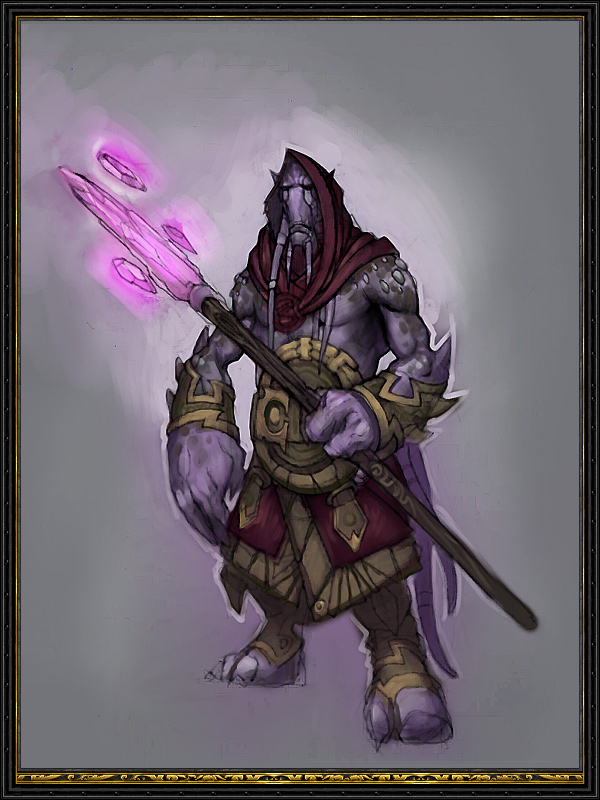 Ingame the colors are better, aye? So: 1. Should I make the shards bigger? 2. Should I discard these particles and try to make the crystals glow a bit someway? (yes, I should) |
| 05-19-2009, 10:28 PM | #6 |
I think you need to make the shards both bigger and more visible; at the moment they're almost completely tranparent. Try setting the blending mode to Add Alpha rather than Additive and select Unshaded and Unfogged if you haven't already. The particles can be used to make a glowy effect, just increase the size, reduce the speed and emission rate and reduce the opacity. Selecting the Model Space option might be handy as instead of being left behind whenever the staff moves, they'll stay at the point of the emitter. Oh and you might want to set the lattitude to 180 as well, that'll send particles outward more uniformly rather than just straight up :) |
| 05-19-2009, 10:49 PM | #7 |
I just made some changes but hell, I can't get a decent screenshot neither in Magos nor ingame, and Wc3viewer crashes. What about trying it yourself for more feedback? :) I have only to try add alpha and *maybe* manage to make that particles still, but now I'm quite satisfied by the results. Don't modify it without my permission :P Edited because: Damned typos!. |
| 05-20-2009, 12:07 AM | #8 |
uhh, request permission to edit? |
| 05-20-2009, 12:11 AM | #9 | |
Quote:
Erm... what do you have in mind? :P (I know, I'm still a noob in such kind of things) |
| 05-20-2009, 12:30 AM | #10 |
A bunch of stuff that'd be way easier to just do directly than try and explain as it's mostly trial-and-error to get right. Things like particle edits, transparency edits, lighting, etc which is quite tedious as you have to keep checking it ingame to make sure it looks right. |
| 05-20-2009, 12:32 AM | #11 | |
Quote:
You're so good at tempting young model editers... well, ok. I guess this means you liked this model a bit, also if it's such a simple edit. :) |
| 05-20-2009, 01:13 AM | #12 |
Ok, so here's what I've done: - Replaced the particle texture with one that's a bit more textured - Resized the particles and changed their opacity so that it appears smoother - Added a new layer underneath the purpleglow layer in the crystal's material which I added the white.blp texture to prevent the crystals from being lost in the particles - Added a light effect - Changed the texture of the ribbon emitter You don't have to use it of course, just thought I'd give it a whirl :) |
| 05-20-2009, 01:18 AM | #13 | ||
Quote:
Hey! Do I seem crazy? Thanks a lot, sir. when I'll use it and if I'll ever submit it somewhere, you'll get half of the credits on it for such a good lightning job :)
|
| 05-20-2009, 07:30 AM | #14 | |
Quote:
This is an excellent model i liked it even before AR did stuff to it.... you shouldnt say things like that, it actually makes your stuff less impressive... if you honestly believe everything you do is worth peoples attention, than it IS.... That is different from believing your stuff is better than it is... dont do that... but dont ever doubt your stuff either.... |
| 05-20-2009, 10:46 AM | #15 | ||
Quote:
Well, thanks. That's only my way of forcing people to comment, since... they gave me a lot of tips about editing, but not a single real comment on the realization... To be short: I want to know from expert modelers if I'm going in the right direction. Quote:
Fix'd. xD But, well, that's a point, you *may* be right. :P |