


| 12-28-2005, 09:17 AM | #1 |
In this tutorial I will tell you how to make the crystal effect used in Mc!'s Crystal Golem and my Crystal Dragon Tools Needed Warcraft 3 TFT (ROC also possible but I use a TFT ingame skin) Notepad or Wordpad War3Fileconverter Warcraft3 Viewer or/and Magos' model editor Vertex modifier (or another modeling program) Knowledge Needed basic model exporting knowledge basic mdl editing knowledge basic modeling knowledge Getting started First you need to find a model you want to make in to a crystal one in this tutorial we'll use the frog model, because it has only one geoset and is a very simple model, but the technique works the same with every other model, it's just more work with more complex models Note: remember to save your files regularly 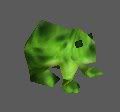 First, extract the frog model from the Mpq file. Then you use the file converter to convert the .mdx frog model in to an .mdl file. Mdl Editing Now, open the .mdl file, the first thing we do, is change the path of the skin so it uses the crystal texture. This is what it looks like Code:
Textures 1 {
 Bitmap {
  Image "units\Critters\Frog\FrogSkin.blp",
 }
}
Change it to Code:
Textures 1 {
 Bitmap {
  Image "Textures\CrystalOpaque.blp",
 }
}
Now for the model to really look like crystal the textures, materials and geosets have to be copied and make them work propperly, since this model only has one texture, one material and one geoset, thats not going to be that difficult, with more textures, materials and geosets it's just the same, only more copieng work to do. Copying the textures Copy this and put it right below it Code:
 Bitmap {
  Image "Textures\CrystalOpaque.blp",
}Code:
Textures 1 {
 Bitmap {
  Image "Textures\CrystalOpaque.blp",
 }
 Bitmap {
  Image "Textures\CrystalOpaque.blp",
 }
}
Copying the Materials it's almost the same with the materials copy this: Code:
 Material {
  Layer {
   FilterMode None,
   static TextureID 0,
  }
}Code:
Materials 1 {
 Material {
  Layer {
   FilterMode None,
   static TextureID 0,
  }
 }
 Material {
  Layer {
   FilterMode None,
   static TextureID 0,
  }
 }
}Code:
Materials 1 {
 Material {
  Layer {
   FilterMode None,
   static TextureID 0,
  }
 }
 Material {
  Layer {
   FilterMode Additive,
   static TextureID 1,
  }
 }
}Copying the Geosets By copying the geosets and changing what kind of material ID it should use you can create the overlaying transparent look that makes it look like crystal. Since the geoset code is really long I'll only copy a small part in to this tutorial the geoset begins with this: Code:
Geoset {
 Vertices 157 {
  { -12.3964, 1.52395, 0.31411 },
  { -0.52003, 2.88477, 0.33941 },
  { -5.1976, 4.42178, 3.53995 },
  { -13.4577, 4.11941, 0.31442 },
  { -8.1316, 10.2445, 0.33869 },
  { -3.29927, -0.21647, 3.66749 },
  { -5.1976, 4.42178, 3.53995 },
  { -0.57432, 7.25025, 10.4476 },
{ 6.04609, 6.50425, 11.3752 },Code:
  Matrices { 10, 11 },
  Matrices { 11 },
  Matrices { 12, 13 },
  Matrices { 12, 13, 14 },
  Matrices { 13, 14 },
  Matrices { 14 },
 }
 MinimumExtent { -28.2479, -14.3093, -9.09061 },
 MaximumExtent { 19.7491, 27.7945, 46.2399 },
 BoundsRadius 28.6633,
 Anim {
  MinimumExtent { -28.2479, -14.3093, -3.77587 },
  MaximumExtent { 19.7491, 15.0309, 46.2399 },
  BoundsRadius 26.3345,
 }
 Anim {
  MinimumExtent { -17.6841, -10.6745, -0.0313365 },
  MaximumExtent { 11.7315, 10.2365, 20.4019 },
  BoundsRadius 18.3231,
 }
 Anim {
  MinimumExtent { -19.204, -10.68, -9.09061 },
  MaximumExtent { 12.7842, 27.7945, 32.1506 },
  BoundsRadius 24.6313,
 }
 MaterialID 0,
 SelectionGroup 0,
}Code:
 }
 Anim {
  MinimumExtent { -17.6841, -10.6745, -0.0313365 },
  MaximumExtent { 11.7315, 10.2365, 20.4019 },
  BoundsRadius 18.3231,
 }
 Anim {
  MinimumExtent { -19.204, -10.68, -9.09061 },
  MaximumExtent { 12.7842, 27.7945, 32.1506 },
  BoundsRadius 24.6313,
 }
 MaterialID 0,
 SelectionGroup 0,
}
Geoset {
 Vertices 157 {
  { -12.3964, 1.52395, 0.31411 },
  { -0.52003, 2.88477, 0.33941 },
  { -5.1976, 4.42178, 3.53995 },
  { -13.4577, 4.11941, 0.31442 },
  { -8.1316, 10.2445, 0.33869 },
  { -3.29927, -0.21647, 3.66749 },
  { -5.1976, 4.42178, 3.53995 },
  { -0.57432, 7.25025, 10.4476 },
{ 6.04609, 6Code:
} MaterialID 1, SelectionGroup 0, } 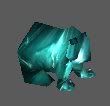 (this is a screenie take with magos model editor, in the wc3 viewer it looks different) Model editing in vertex modifier One of the geosets has to be resized to get that overlapping transparent look. Since this is a really simple model, this part is about the easiest, but with a complex model like the Crystal Dragon it's much harder. Open the vertex modifer, and open the .mdl frog model. You'll get a popup window that asks you wich geoset you want to open, because only the second geoset has been modified (the materialID) we are going to open that one 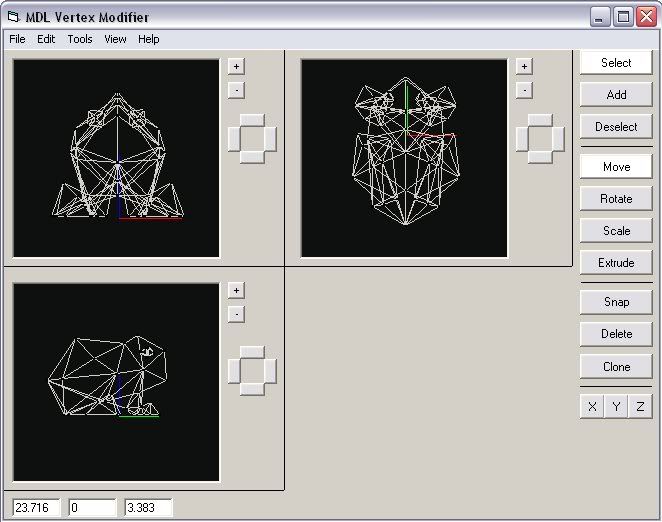 there are two ways to make that crystal effect, you simply make one geoset bigger then the other (like Mc! did with his Golem), or you could make it bigger piece by piece (like I did with my Dragon), this takes much more time, but the result can be more detailed, and less messy, but the frog model it a really simple one, so it won't really matter if we just resize one geoset, once you have resized it a bit, save it and convert it back to .mdx it should now look like this: 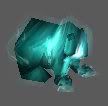 If it does, then you're finished! Finishing up Some times you have to tweak the model a little bit to make it look just right there are also a few things you can do to change the look of the crystal effect a bit You can brighten the transparent part by making it twosided this is how you do that in the mdl file Change this: Code:
Materials 1 {
 Material {
  Layer {
   FilterMode None,
   static TextureID 0,
  }
 }
 Material {
  Layer {
   FilterMode Additive,
   static TextureID 1,
  }
 }
}Code:
Materials 1 {
 Material {
  Layer {
   FilterMode None,
   static TextureID 0,
  }
 }
 Material {
  Layer {
   FilterMode Additive,
   TwoSided,
   static TextureID 1,
  }
 }
}Normal Twosided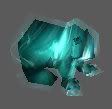 the differance isn't that noticable, but with models where the layers overlap eahc other more you can see a great differance, my Crystal Dragon uses a twosided outside, and Mc!'s Crystal Golem doesn't Here below you can see the examples My Crystal Dragon  Mc!'s Crystal Golem Have fun with making your own crystal creatures! And special thanks for Mc! for teaching me how to make this effect. |
| 12-28-2005, 01:05 PM | #2 |
While it is a very nice looking effect, you have to keep in mind somethings. This is wc3, a subtle effect like that might not be very noticed. It also can almost double your poly count, and seeing as how your example is a WoW model, that'll be a nearly unusable model. It has over 5k polies! It is possible to do the same with particles, my fav example is the fel warlock spell animation (doesn't it look soo uber :P ) , I'm not an expert at it, but you should try and experiment nonetheless good for low poly models, rep given good tut |
| 12-28-2005, 01:08 PM | #3 |
Well, you'll be surprized how small that Crystal Dragon file is, it's just ove 500 kb, and yes the poly count is very high, but I didnt have any problems with it, and it wasn't meant as a normal unit, more as a boss or something. but anyway, thanks for the rep. |
| 12-28-2005, 01:12 PM | #4 |
I think the size is a big problem, the general agreed upon size for a b.net game is about 1 mb or so, if you take half of it up to import a dragon... and polies should really be taken more seriously, I mean these days 1k polies is okay, but 5k? That really pushes it, it's higher than the rocking arthas model (which generates a lot of lag for me). I though sear implemented a no model over 3k polies rule, simply because models over 3k were unusable. It's a good tut, but pay attention to the polies! and np |
| 12-28-2005, 01:39 PM | #5 |
maybe the Crystal Dragon thread is a better place to discuss this... |
| 12-28-2005, 01:53 PM | #6 | ||
Quote:
'Just'? Was that sarcasm? :P 500 kB is high for a model. Polycount in a model won't be a problem when you play the game most of the time, but it matters when the game ends. One or two of those high poly-units spawned in a map is okay, but if it's used as a massed-type unit, then you'll experience some lag before the game ends. Quote:
I had made some crystal stuff before, with a layer of animated textures. Tell me that it's a subtle effect:  <___< |
| 12-28-2005, 02:01 PM | #7 | |
Quote:
|
| 12-28-2005, 02:03 PM | #8 |
well that's a WoW model, WoW is okay since you don't have to DL files b4 playing. but in b.net, dling a 500kb dragon could be annoying |
| 12-28-2005, 03:39 PM | #9 |
Uberleetpwnage: You made that crysta Dragon Spawn model? I always wanted to know who made that . It appeared in Grater's avatar I think? |
| 12-28-2005, 04:51 PM | #10 |
That's alfred from wc3sear.ch |
| 12-29-2005, 04:50 AM | #11 | |
Quote:
Correct. Vexorian, mind checking my email address? :P EDIT: Gif was made by Skizot, because my computer sucks and lags when I use video capture programs. That Dragonspawn model was inspired by a Might and Magic VIII monster, and since RightField had Crystal Golems updated by me with the same effect.... So I decided to make this. Was this the avatar?  |
| 12-29-2005, 01:53 PM | #12 | |
Quote:
That effect was made with billboarded planes, not particles.  |
| 01-01-2006, 12:42 PM | #13 |
Olof. There is no need to have two identical Textures. Just point both materials at the same texture. |
| 01-08-2006, 08:43 AM | #14 | |
Quote:
|
| 01-22-2006, 01:29 AM | #15 |
hmnn, this goes to mdl editing I think |