HomeUser Control Panel (unavailable in archive)ForumsTutorialsArt GalleryResourcesMaps

Crystal effect for Icons

01-06-2006, 10:25 PM#1
Mc !
Well I made out this tut, enjoy. With this tut you can make things like these:
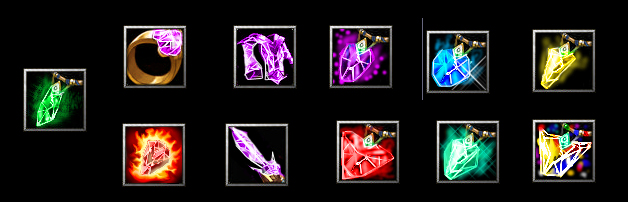
Zoom (requires log in)

Impossible? nah.


Select a color and a shape

Paint it a white contour

Now draw some random lines, be as crazy as you want!

Use the paint buclket with a 25% opacity in random places that are limited by the white lines with the colors black and whit(so black for shadows and white for lights) you can use it in a place more than a time, it is better for the 3d effect


Use a white overlay in the places you want shiny

Use the airbrush to put a main light up.


Now the glowing!!

Use the airbrush with a white color in the contour

Overlay the last parts of the glow with white and the color you want it to glow

And finally use the smudge tool for making the glow look nice!


And so, you're done, enjoy making crystals!

Attached Images
File type: jpgCrystalIcons.jpg (114.2 KB)
File type: jpg1.jpg (16.9 KB)
File type: jpg2.jpg (17.3 KB)
File type: jpg3.jpg (19.7 KB)
File type: jpg4.jpg (18.8 KB)
File type: jpg5.jpg (19.3 KB)
File type: jpg6.jpg (19.4 KB)
File type: jpg7.jpg (18.6 KB)
File type: jpg8.jpg (20.3 KB)
File type: jpg9.jpg (19.4 KB)
01-07-2006, 12:21 AM#2
Ignitedstar
That's neat. It's nice and simple. Good tutorial. :)
01-29-2006, 10:27 PM#3
Mc !
Updated
01-29-2006, 10:33 PM#4
Murder1833
Your pictures are sorta, eh, not there.
02-03-2006, 10:56 PM#5
Mc !
updated once again... Hope now is done ^^
02-08-2006, 07:10 AM#6
olofmoleman
looks a bit like a sock...
anyway, nice tut.
02-08-2006, 07:10 PM#7
Mystic Prophet
Useful, simple, and easy to understand. Rep added.
02-08-2006, 09:22 PM#8
THE_END
Ah yes this tutorial, you sent me this on MSN, goooddd stuff
02-09-2006, 02:21 PM#9
Meanie
What is Airbrush? does something similar exist on Photoshop Elements 2.0?
02-10-2006, 01:52 AM#10
Murder1833
You cease to unamaze me (did I say that right?)
02-10-2006, 03:51 PM#11
Plasma Dragon
Heh, nice. Looks like it works pretty well so I'll give you the rep you deserve, Mc !
Attached Images
File type: jpgBlue Fire Emerald.jpg (27.4 KB)
03-06-2006, 07:20 AM#12
Jacek
Quote:
Originally Posted by Meanie
What is Airbrush? does something similar exist on Photoshop Elements 2.0?
airbrush = spray
09-15-2006, 11:29 AM#13
rivalry14
Very nice tutorial.
09-27-2006, 04:43 PM#14
Amdor
I love this tut - i made my firs icon of this type.


not bad i think as a first??
03-01-2007, 05:36 PM#15
Desert_Warrior
First of all nice tutorial !

Second I would really like to know how you did the lens effect ot those tiny shine colored clouds in some of your sample picks

Keep up the good work