HomeUser Control Panel (unavailable in archive)ForumsTutorialsArt GalleryResourcesMaps

Linking Maps in Campaigns!

11-06-2006, 10:37 PM#1
Hero12341234
I have a question how do i link maps in a campaign together?

It is really frustrating I already read the Game Cache Tutorial..but still no cigar..

any help?
11-07-2006, 05:58 AM#2
Captain Griffen
Game - Set net level to <map>.
Game - Victory for player 1.
11-07-2006, 07:42 PM#3
Hero12341234
I get that part it's just the map

What do i put for a map that is in a campaign?
11-07-2006, 11:24 PM#4
Argo
Step 1
Zoom (requires log in)

Step 2
Zoom (requires log in)

Step 3
Zoom (requires log in)
*(make sure the first map is visable when first loaded)

Edit: **Dont forget to import the maps (in the general tab)**
Attached Images
File type: jpgstep1.JPG (5.4 KB)
File type: jpgstep2.JPG (30.6 KB)
File type: jpgstep3.JPG (14.3 KB)
11-09-2006, 01:20 PM#5
Hero12341234
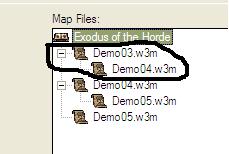
Click image for larger version

Name:	What.JPG
Views:	10
Size:	8.0 KB
ID:	15449

ok is that needed?

Cause i'm trying to save the hero in a game cache and then load the next map with out having to use buttons and then Restore him...the game cache part i have working it's the "loading the next map" part that won't work for me....it won't load the next map all it does is just kick me to the campaign screen...and yes i tested in WC3 TFT not in WE

so i want to know if that sub catergory thing they did..is it needed?

they did something similar to this thing I am doing in the HeroRPG Campaign i believe it is called....it just rolls into the next map....and there is only 1 button whihc says "Load"

Attached Images
File type: jpgWhat.JPG (8.0 KB)
11-09-2006, 03:53 PM#6
Captain Griffen
HeroRPG had a campaign button that loaded a map that sent you to the correct map.