HomeUser Control Panel (unavailable in archive)ForumsTutorialsArt GalleryResourcesMaps

Dark Lightning

04-13-2008, 12:06 AM#1
JetFangInferno
Made it for a request. 4 custom textures, 3 for the animated lightning and 1 for the nova. WC3 lacks modulate textures :(
Attached Images
File type: gifDarkLightning.gif (1.9 MB)
04-13-2008, 12:22 AM#2
Dwarf Zealot
sweet, but modulate is one of the options you can check off in magos.
04-13-2008, 12:26 AM#3
JetFangInferno
Not alot of textures support modulate and only modulate and blend can produce textures with a "dark" atmosphere to it.
04-13-2008, 03:15 AM#4
Mc !
So what if it lacks modulate textures? You can use other textures in a different way just so it adjust to your needs (For exampla for a dark thunder you can use a plane with two faces, the left face uses the right side of a thunder skin while the another one uses the left side, so basically you can invert the texture that way)

Nevertheless, looks nice. Just remove the omni light at the end, it has no sense a dark flame generates light.
04-13-2008, 03:18 AM#5
Nuclear Arbitor
cool but I'm not sure what id be used for.
04-13-2008, 03:36 AM#6
JetFangInferno
Quote:
Originally Posted by Mc !
So what if it lacks modulate textures? You can use other textures in a different way just so it adjust to your needs (For exampla for a dark thunder you can use a plane with two faces, the left face uses the right side of a thunder skin while the another one uses the left side, so basically you can invert the texture that way)

Nevertheless, looks nice. Just remove the omni light at the end, it has no sense a dark flame generates light.

I don't really understand what the inversion does :( And yes, I should remove the omni lol.
04-13-2008, 03:49 AM#7
Mc !
Well, let's say you want to make a dark thunder. We'll use Zap1.blp for the example, but using another lightning skin might work betterly.

Click image for larger version

Name:	Zap1.jpg
Views:	4
Size:	22.3 KB
ID:	33232

Here we got the skin, now we apply it to a plane with two faces. Face A and Face B, the unwrap will probably be like this:
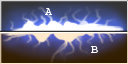
Click image for larger version

Name:	Zap2.jpg
Views:	9
Size:	24.4 KB
ID:	33233

We separate both faces in the unwrap, and put B where A was, and A where B was. And the plane will then look like this:

Click image for larger version

Name:	Zap3.jpg
Views:	11
Size:	22.3 KB
ID:	33234

Which is an interesting texture to be used for modulate materials. It might work better with textures that have a contined lightning not like this one.

Attached Images
File type: jpgZap1.jpg (22.3 KB)
File type: jpgZap2.jpg (24.4 KB)
File type: jpgZap3.jpg (22.3 KB)
04-13-2008, 07:06 AM#8
JetFangInferno
Interesting, thx! You are the epitome of godliness!
04-13-2008, 05:02 PM#9
KrewL RaiN
Purple lightning ftw. Your sfx are always awesome.
04-13-2008, 07:31 PM#10
JetFangInferno
Updated it, removed 1 custom texture and removed the little black flames and omni in the end.

04-13-2008, 08:01 PM#11
KrewL RaiN
looks much better now
04-13-2008, 09:10 PM#12
Nuclear Arbitor
except at the end it freezes for a second and theres a little purple burst. the lightning looks like yarn too.
04-13-2008, 11:24 PM#13
Mc !
You're still using 3 other custom textures? where?
04-15-2008, 09:31 AM#14
personic_user_victor
so cool *in awe* all the possibilities for stuff
i wish i can make my own models and such, but i cant find anything to do that with make and also i would have no idea where to start....im good at making non-cinematic skills
04-20-2008, 05:56 AM#15
JetFangInferno
Yup, there are the 3 animated textures for the lightning. Had to invert all of them and make them purple :(